
Dream Home Coloring book
LoveColoring GameBoard
4.81.11K Reviews
- Version
- 2.2.1
- Installs
- 1.00M
- Age Rating
- Everyone
Screenshots
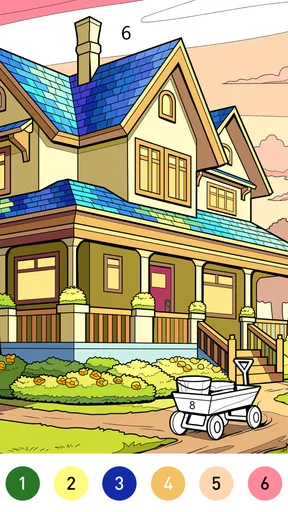
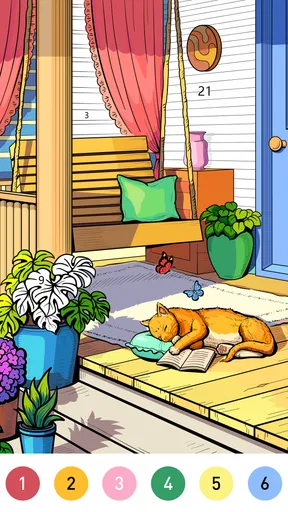
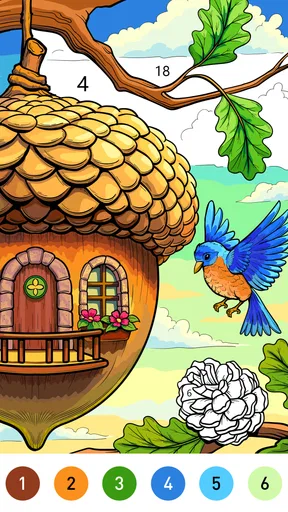
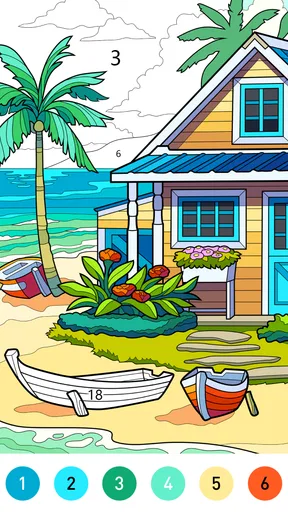
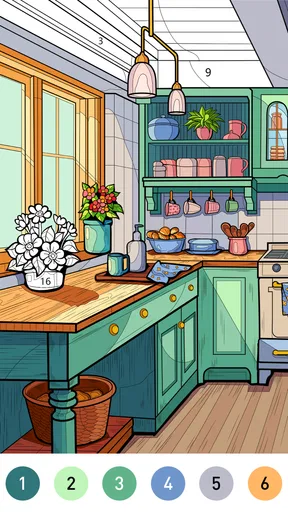
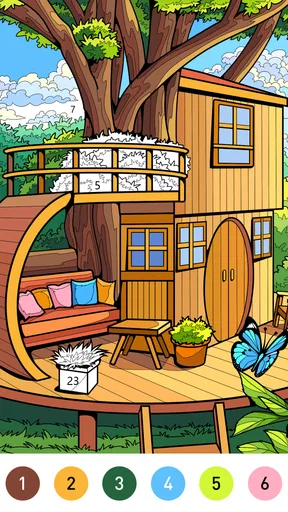
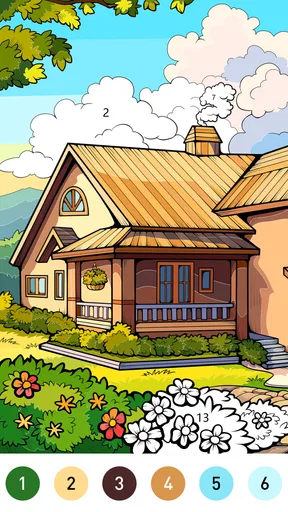

Our Review of Dream Home Coloring book
 Analysis by Appyee
Dream Home Coloring book is the kind of board game I open when I want something calm, simple, and easy to understand within a few seconds. Instead of asking me to learn rules or compete against another player, it turns rooms and home scenes into coloring activities. The appeal is immediate: choose a picture, add color, and slowly make the space feel finished. It is a gentle experience rather than a demanding game, and that distinction matters when deciding whether it belongs on your phone.
I found the best way to approach Dream Home Coloring book is as a relaxing creative break, not as a traditional puzzle or strategy title. The game is free to download, suitable for Everyone, and developed by LoveColoring Game. Its home-focused theme gives it a more specific personality than a general coloring app, especially if you enjoy imagining room layouts, decorative details, and cozy interiors.
The game has attracted over a million installs and holds a 4.8 average from around 32 thousand ratings, which suggests that its straightforward idea works for a broad audience. I would still avoid treating those figures as a guarantee that every player will love it. People who want fast competition, deep customization, or a clear win condition may find the experience too quiet. For the right player, though, that quietness is exactly the point.
What to expect when you enter the home-themed coloring world
The first thing to understand is the rhythm. You are not building a complete house from scratch in the way a construction simulator might work, and you are not managing money, residents, or resources. The focus is coloring home and room illustrations. That makes each session easy to start and easy to leave, which suits short breaks during a commute, a few minutes before bed, or a relaxed afternoon when I do not want a game demanding constant attention.
The board-game category label may sound unusual for a coloring title, but it helps place the app among casual, turn-free experiences rather than action games. There is no need to memorize controls or react quickly. Most of the satisfaction comes from seeing an ordinary-looking room become more personal as color is added. I especially like this format for players who enjoy the visual reward of completing a picture but do not want the pressure of a timer.
The house theme also changes how I choose colors. With an abstract coloring page, I may simply fill areas at random. Here, I naturally think about whether a wall should feel warm, whether furniture should match, or whether a small decorative object deserves contrast. That gives the activity a little more direction without turning it into a demanding design tool.
One useful expectation to set is that this is primarily a guided coloring experience. If you are looking for a full interior-design sandbox where every object can be moved, resized, or replaced, this is not the same type of product. Its strength is the controlled page-by-page process. The game gives me a defined scene, and I decide how to make it feel inviting within that scene.
The age rating of Everyone makes it suitable for a wide range of players, including families looking for a low-pressure activity. I would still recommend that parents look at the purchase options before handing over a device, because optional in-app items range from $0.99 to $49.99 each. The free entry point is welcoming, but the presence of purchases means a child’s device should have the usual purchase protections enabled.
Installing it without overthinking the first launch
The game runs on Android 8.0 or later, so it is aimed at a wide range of devices rather than only recent phones. After installation, I would begin with a small expectation: the goal of the first session is not to finish everything. It is simply to understand how a picture is selected, how an area is filled, and how the completed result is handled.
That mindset makes the opening much less confusing. Coloring games often look busy because a page can contain walls, furniture, windows, plants, and small decorative objects all at once. I find it easier to choose one large area first, such as a wall or floor, rather than immediately trying to deal with tiny details. A broad first action shows how the coloring interaction responds and gives the page visible progress.
If you are installing it on an older phone, the minimum operating-system requirement is the first compatibility check to make. Beyond that, the practical question is whether the screen is comfortable for tapping small sections. A larger display can make detailed room illustrations easier to work with, while a compact phone may encourage you to zoom in or take a slower approach when working around furniture edges.
The current version is 2.2.1. I mention that because it is useful to check that your installation is current if the interface does not behave as expected. Updates can change the feel of navigation, and a first-time user should not assume that a tutorial or button is missing simply because another review described it differently.
How I reached the first satisfying result
My recommended first workflow is deliberately simple. I select one room illustration, choose a color that is easy to distinguish from the surrounding areas, and fill a large section before experimenting with smaller parts. This produces a visible result quickly and avoids the common mistake of spending the opening minutes searching for the perfect palette.
Once the first large section is colored, I move to a second area that gives the room contrast. For example, a wall and a piece of furniture can be treated differently so the picture starts to read as a space rather than a collection of disconnected shapes. This is a small but useful creative trick: contrast creates the feeling of progress faster than filling several similar sections with nearly identical shades.
I also recommend leaving the smallest decorations until later. Tiny objects can be satisfying, but they are not the best place to learn the controls. They require more precision and may make a new player think the game is fiddly when the larger areas are actually quite approachable. Completing the broad shapes first gives me a visual map of the room and makes the detail work feel optional rather than stressful.
The first meaningful success is not necessarily a fully completed page. For me, it is the moment when the room begins to look intentional. A simple combination of a calm base color, a contrasting furniture color, and a few carefully chosen accents is enough. That result teaches the main loop while leaving room to improve the picture later if I feel like continuing.
Another practical tip is to avoid changing every color whenever a section looks imperfect. A room can still feel coherent with a limited palette. Reusing one color in two related areas, such as a cushion and a small decoration, creates a visual connection and reduces decision fatigue. This is especially helpful for children or anyone who wants relaxation rather than a long design session.
Small decisions that make the experience smoother
The most useful habit I developed was separating “completion” from “perfection.” If I stop to reconsider every tap, the game becomes slower than it needs to be. I prefer to establish the main colors first and then decide whether a few details deserve adjustment. That order keeps the activity relaxing and gives me a finished-looking scene sooner.
I also treat each page as a short creative exercise instead of part of a large obligation. That matters because the game does not need to replace a full hobby to be worthwhile. Ten quiet minutes can be enough to reset my attention. If I have more time, I can continue; if not, I can leave with a visible piece of work rather than a half-finished competitive match.
For younger players, choosing a simple color plan before starting can prevent frustration. A parent might suggest a theme such as warm colors for the living area or cool colors for a bedroom, then let the child make the final choices. This turns the game into a conversation about rooms and moods without requiring formal art instruction.
For adults, the same approach can work as a low-effort decompression routine. I would use it after a busy day when I want something more engaging than scrolling but less demanding than a strategy game. The home setting makes it particularly easy to settle into because the subject matter is familiar and does not require a complicated fictional world to understand.
Where first-time players may feel uncertain
The main possible confusion is assuming that the game should behave like a full design simulator. It is better understood as a coloring activity built around home imagery. If you expect to redesign the architecture or freely place objects, you may feel restricted. The fixed illustration is also what keeps the experience approachable, so that limitation is part of the trade-off rather than an accidental flaw.
Another point to keep in mind is the difference between a free download and a completely purchase-free experience. You can enter without paying, but optional items are available through in-app purchases. I would not make a purchase during the first session. First decide whether the basic coloring loop is enjoyable on its own. If it is, you can then consider whether an optional item adds enough value for your personal use.
The purchase range is broad, from $0.99 to $49.99 per item, so I would be especially careful on a shared family device. The safest routine is to let a child color independently while an adult handles any decision involving purchases. This is not a criticism of the coloring concept; it is simply a sensible boundary whenever a free game includes paid additions.
Some players may also wonder whether the game is suitable for competitive play. In my view, it is not the right pick if your main motivation is beating friends, climbing a leaderboard, or improving a measurable score. Its reward is visual completion and personal preference. If you need a stronger sense of challenge, a traditional board game or puzzle app will probably provide more structure.
There is a similar trade-off with replay value. A coloring page can remain enjoyable because you can make different artistic choices, but that is a softer form of replay than a game with changing levels or opponents. I return when I want the activity itself, not because I am chasing a dramatic new outcome every time. Players who need constant novelty should know that before settling in.
How it compares with ordinary coloring apps and board games
Compared with a general coloring app, the home theme gives this game a clearer identity. I am not choosing between unrelated animals, patterns, landscapes, and characters; I am working within a familiar domestic setting. That focus can make color decisions easier because I already understand what a sofa, wall, table, or plant is supposed to represent.
Compared with a traditional digital board game, it removes most of the tension. There are no turns to wait through, no opponent to predict, and no rules dispute to resolve. That makes it better for solitary relaxation, but less satisfying for someone who wants social interaction or tactical decisions. The category may attract board-game fans, yet the actual appeal is closer to a peaceful creative pastime.
Against a full interior-design game, Dream Home Coloring book is simpler and less flexible. I cannot treat it as a serious room-planning tool, and I would not use it to test a real renovation idea. Its advantage is that I can begin immediately without learning a design system. The fixed scenes provide enough structure to make coloring feel purposeful while avoiding the complexity of managing a virtual property.
That middle position is why I think it works best for first-time users. It offers more personality than a completely abstract coloring page but does not ask me to become a designer or strategist. If you want a calm activity with a recognizable setting, that balance is appealing. If you want simulation depth, multiplayer, or demanding puzzles, another category will serve you better.
Who will enjoy it, and who should move on
I would recommend it to people who like home decoration themes, casual coloring, and games that can be played in short, interruption-friendly sessions. It is also a reasonable choice for families because the Everyone rating and simple premise make the activity easy to explain. A child can enjoy the colors, while an adult can appreciate the quieter pace and the satisfaction of making a room look coordinated.
It suits users who want a clear first step. Select a scene, begin with a large area, establish a small palette, and add details only when the main structure feels right. That path from installation to a finished-looking result is reassuring because there is little pressure to master a complex system before enjoying the game.
I would skip it if your definition of a game requires competition, story progression, resource management, or difficult objectives. I would also look elsewhere if you want unrestricted interior design, because the coloring format naturally limits how much you can alter. The experience is intentionally gentle, and players who find repetitive creative tasks boring may not get enough variety from the central loop.
My final recommendation is to try the free version with a short, practical test: color one large room area, add a contrasting element, and see whether the process helps you relax. If that small result feels satisfying, the game has probably found its audience in you. If it feels like busywork, paying for optional items will not change the basic nature of the experience.
LoveColoring Game has chosen a focused idea and kept the entry barrier low. The result is not a replacement for a competitive board game or a serious design simulator, but it does not need to be. For a peaceful home-themed coloring break, Dream Home Coloring book is at its best when you let the picture guide you instead of trying to turn it into something more complicated.
Verdict
Strengths of Dream Home Coloring book
- Relaxing coloring activities suitable for short or longer sessions.
- Wide range of home-themed illustrations to complete.
- Simple controls make coloring accessible for most users.
- Helpful color palettes reduce the effort of choosing shades.
- Works well as a casual, low-pressure creative pastime.
Limitations of Dream Home Coloring book
- Some artwork and features may require in-app purchases.
- Repeated coloring mechanics can feel monotonous over time.
- Ads may interrupt the experience for free users.
- Small details can be difficult to color accurately on phones.
- Limited creative freedom compared with a fully blank canvas.
Other Releases by LoveColoring Game
View All
Fairytale Color by number game
Board4.9

Tangle Color by Number Book
Board4.9

Country Farm Coloring Book
Board4.9

Pop Color - Paint by number
Board4.8
Similar Picks in This Category
View All
Ludo King®
Gametion4.1

Ludo
Yarsa Games4.6

Tile Master® - Matching Game
Higgs Studio3.6

Checkers Online
CC Games4.6

Dominoes
Loop Games4.7

Chess
Chess Prince4.6
Frequently Asked Questions
What is Dream Home Coloring Book?
Dream Home Coloring Book is a relaxing digital coloring app focused on interior design and home decoration scenes. It lets you color rooms, furniture, gardens, and other cozy spaces using a selection of palettes, patterns, and decorative details. The app is designed for casual play, creative expression, and stress relief rather than complex gameplay or professional design work.
Is Dream Home Coloring Book free to download and use?
The app can generally be downloaded for free, but some coloring pages, tools, color collections, or other features may require in-app purchases or optional subscriptions. Depending on the version and device, advertisements may also appear while using the app. Before confirming a purchase, check the store listing and the payment details shown inside the application, especially if children may use the device.
Does Dream Home Coloring Book work without an internet connection?
Some basic coloring activities may be available offline after the app and its required content have been installed, but access can vary by version. Advertisements, new designs, cloud synchronization, rewards, and certain downloadable collections may require an internet connection. For the most reliable experience, open the app online at least once and download any available content before using it while traveling or away from Wi-Fi.
Is Dream Home Coloring Book suitable for children?
Dream Home Coloring Book is generally easy to understand because it uses simple touch controls and familiar coloring mechanics. However, parents should review the age rating, advertising, privacy information, and in-app purchase settings before allowing younger children to play. Some pages or promotional content may not be specifically designed for every age group, so parental supervision and purchase restrictions are recommended.
What features should I expect when using Dream Home Coloring Book?
The main experience centers on selecting a picture, choosing colors, and filling areas by tapping or dragging on the screen. Depending on the release, you may also find hints, undo tools, color palettes, decorative themes, progress rewards, and options for saving or sharing finished artwork. It is best suited to short, relaxing sessions, although locked content and advertisements can affect the overall pace.
Play our best games!


